IE Set-up for EMS 4.2
When using Internet Explorer with EMS 4.2, version 9 or higher is required.
In order to see the buttons at the bottom of the forms, the screen resolution will need to be set to 1280x1024 (or higher).
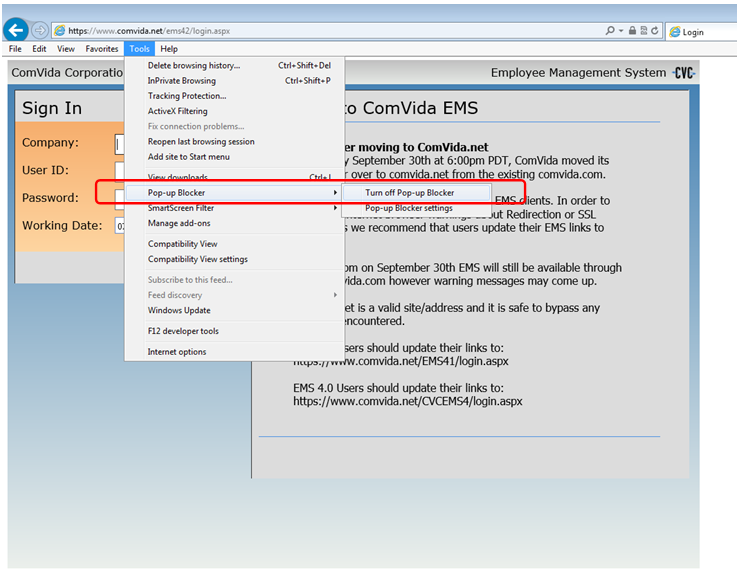
Pop-up Blocker:
Pop-up blockers should be turned off
Go to Tools, Pop-up Blocker then Turn off Pop-up blocker
Check that there are no other toolbars enabled such as Google or Yahoo, which might have their own pop-up blockers (In Internet Explorer, View | Toolbars).
Check the Text Size (In Internet Explorer, Tools | Text Size) - it should be set to Medium for the best viewing experience.
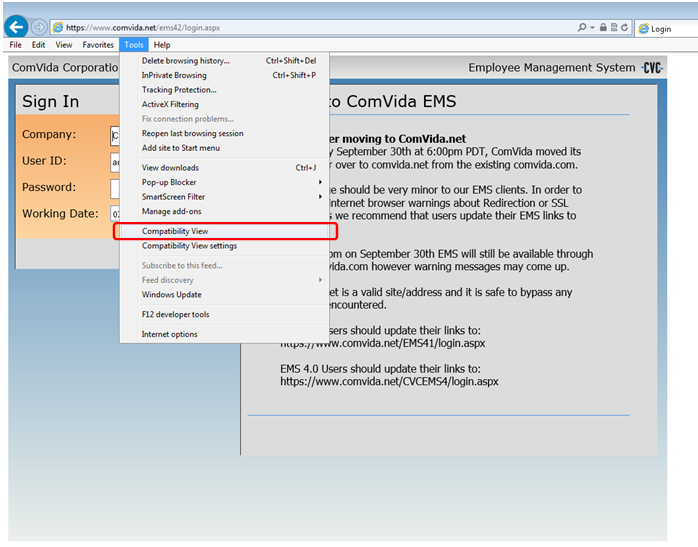
Compatibility View settings:
Check that Compatibility View in the Tools menu is not check marked.
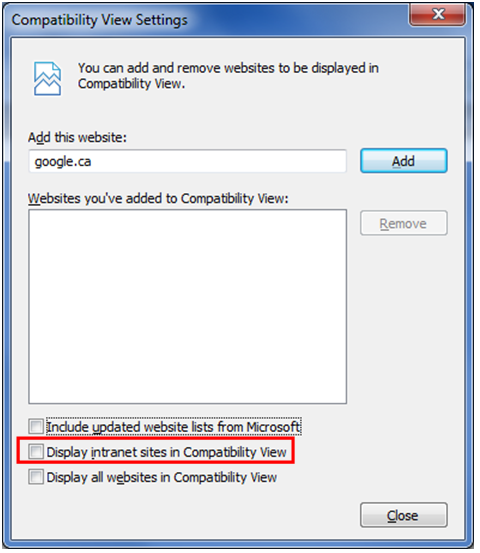
If you access EMS through an intranet (EMS is self-hosted), please make sure that 'Display intranet sites in Compatibility view' is unchecked.
Go to Internet Explorer, Tools | Compatibility View settings: